🇦🇺 Proudly Australian — built in Sydney by a music tutor, for music tutors
Studio management for Australian music tutors
✦ Now with Studio AI
Your complete studio, fused in one flow.
Most tutors piece together their studio from several different tools — a calendar, a spreadsheet, WhatsApp for parents, a separate invoicing app, something else for tracking progress. FusaFlow replaces all of it with professional studio software built specifically for music teachers.
Up to 5 students free, forever · No credit card required · Cancel Studio anytime
✦ Ask your AI Studio Assistant anything. Built in, not bolted on.
Sound familiar?
Too many tools, not enough time.
Running a music studio shouldn't mean becoming a part-time IT admin. Before FusaFlow, most tutors are managing their week across a stack of disconnected apps.
Before FusaFlow
✕Google Calendar
✕WhatsApp
✕Excel spreadsheet
✕Invoice app
✕Email chains
✕Word documents
✕Paper notes
✕No practice tracking
↓
With FusaFlow
♪ One login. Everything in one place. FusaFlow.
S
Simon Watts
Sydney, Australia
20+ years teaching
B.Mus (Perf), M.Mus (Perf)
Sydney Conservatorium of Music
"
From the founder
I'm an Aussie music tutor with more than two decades of experience, and like most tutors I spent way too much time managing students, parents, scheduling and invoicing across a stack of apps that were never designed for this.
I built FusaFlow for Australian tutors — priced in AUD, designed around how we actually work, with GST and BAS built in from the start. I hope it saves you as much time as it saves me.
Simon
See it in action
A real app, for real studios.
Three portals, one platform. Here's what tutors, students and parents actually see.
Tutor dashboard
Revenue, attendance and student alerts at a glance
Student portal
Practice logging with timer, mood tracking and goals
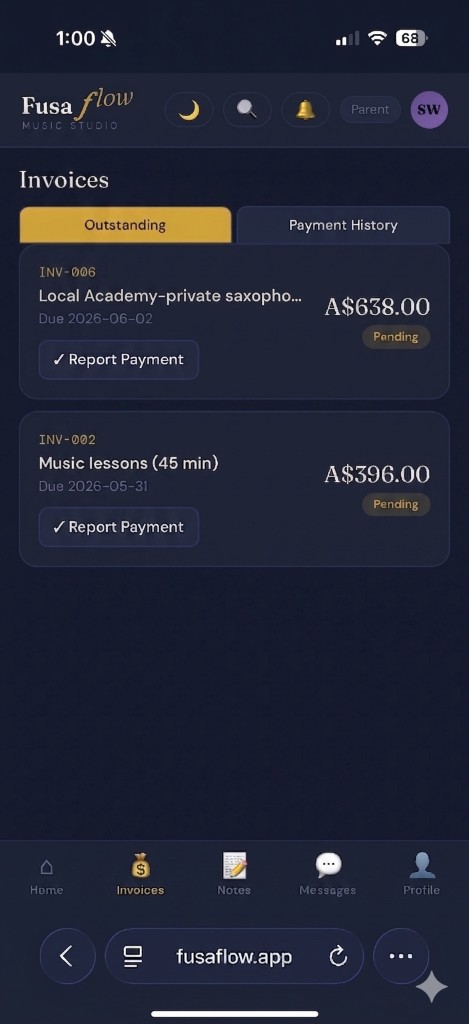
Parent portal
Outstanding invoices and payment history in one place
Everything included
Built for how tutors actually work.
Every feature you need to run a professional studio — from scheduling and invoicing to practice tracking and parent communication. No subscriptions to juggle, no data spread across apps.
Free Included on all plans
★ Studio Studio plan only
★ Studio
🇦🇺
Tax & BAS Ready
Built for the Australian tax system by an Australian tutor — not retrofitted for a foreign market.
GST automatically applied to invoices when enabled — correct ATO handling with no manual calculation
Financial year tax summary — income, expenses, GST collected and claimable
BAS-ready report you can hand straight to your accountant
Xero export for any financial year
Expense tracking with recurring expenses and tax categories
★ Studio · Tutor
★ Studio
✦
AI that knows Sam owes $340 and hasn’t practised in a week.
Ask anything. Built into FusaFlow. Not bolted on.
Pre-lesson briefs, practice checks, overdue invoices — just ask
“Invoice Liam for 10 weeks” opens the form, pre-filled. You tap Save.
Students and parents get an AI practice coach too — included free
★ Studio · Tutor · Student
⏱
Practice Tracking
Students stay accountable between lessons — and you can see the data at a glance.
Built-in practice timer or manual time entry with quick presets
Session notes, mood logging, and optional audio recording
Weekly bar chart with streak tracking and milestone badges
Parents can view practice history and log sessions for young students
Tutor sees full practice history per student in their dashboard
Tutor · Student · Parent
💰
Invoicing & Payments
Professional invoicing you'd expect from dedicated software — built in, not bolted on.
Branded PDF invoices and branded invoice emails with your studio name, ABN, and payment details
Bill New Term — bulk-generate term invoices; create individual invoices with lesson packs
Stripe online payment — parents pay directly from the invoice link
Overdue aging report, payment reminders, client statements, and partial payments
Duplicate invoice shortcuts, saved line items, and public enrolment link for new enquiries
Import your existing clients from a spreadsheet or CSV to get started quickly
Tutor
📝
Lesson Notes
Structured notes that actually stay useful — for you, your students, and their parents.
Write notes with homework, goals, and a mood/energy field per lesson
Attach files or record audio directly in the app during or after the lesson
Note templates so recurring feedback takes seconds, not minutes
Students and parents see notes instantly through their own portal
✦ AI homework suggestion from recent lesson notes
Tutor · Student · Parent
🎯
Goals & Repertoire
Track what students are working towards — and celebrate when they get there.
Set learning goals with measurable targets and progress tracking
Repertoire tracker: pieces move through Learning → Polishing → Completed
Composer, notes, and status history per piece
Milestone badges awarded automatically as goals are achieved
Parents and students can view goals and repertoire in their portal
Tutor · Student · Parent
👨👩👧
Parent Portal
Parents stay in the loop without the back-and-forth texts and emails.
Separate parent login with their own tailored view
View lesson notes, homework, goals, and repertoire in real time
Pay invoices online and view full payment history
See practice history and log practice for younger students
Report absences and message the tutor directly
Parent
★ Studio
📊
Studio Analytics
Understand your studio without digging through spreadsheets.
Revenue dashboard with monthly charts and income by student
Attendance rates and overdue invoice alerts on the home screen
Practice averages and engagement trends across your student roster
AI-generated end-of-term progress reports for each student
★ Studio · Tutor
💬
In-App Messaging
Replace the WhatsApp thread. Keep all studio communication in one place.
Direct messaging between tutor, students, and parents
Broadcast messages to all families at once
Push notification support on all devices
Messaging can be enabled or disabled per student
Waiting list for new enrolment enquiries
Tutor · Student · Parent
📅
Lesson Scheduling
A full studio calendar built around how tutors work — not a generic booking tool.
Book, edit, and cancel lessons individually or as recurring series
Mark attendance in one tap — or bulk-mark a whole day present
Cancellation logging with optional automatic cancellation invoice
Google Calendar sync — schedule stays up to date everywhere
Automatic lesson reminder notifications to students and parents before each lesson
Tutor
🏫
School Mode
Teaching at a school alongside your private studio? FusaFlow handles both.
Separate school location profiles with their own student lists
School Mode disables messaging and recording for shared-device environments
Invoicing to school administration separate from private billing
Full data security and privacy compliance information for IT teams
Tutor
📱
Works on Every Device
Desktop, laptop, tablet, or phone — FusaFlow works wherever you are, with no downloads required.
Runs in any browser — Chrome, Safari, Firefox, Edge — on Mac, Windows, iOS and Android
Add to your phone or tablet home screen for a full app experience — no App Store needed
Subscribe your lesson schedule to Apple Calendar, Outlook, or any calendar app
Syncs when you're back online after brief connectivity loss
Global search across students, invoices, notes, and clients
White-label studio branding — your colours, your name
Tutor · Student · Parent
Three portals, one platform
Built for everyone in your studio.
Every person in your studio gets their own tailored experience — tutor, student, and parent.
𝑇
Tutors
Run your entire studio from one dashboard. Less admin, more teaching.
Full student and client management
Lesson scheduling, attendance & cancellations
Invoicing, tax summaries & BAS reports
Expense tracking with Xero export
Lesson notes, homework & progress reports
Studio analytics & revenue dashboard
Waiting list & enrolment enquiries
✦ AI Studio Assistant — invoices, lessons, briefs & reports from plain English
Broadcast messaging to all families
Google Calendar sync
𝑆
Students
Stay motivated, track progress, and stay connected with your teacher.
Practice timer and session logging
Weekly practice chart and streaks
Goals with measurable targets
Repertoire tracker by status
Homework checklist
Lesson notes and audio recordings
Milestone badges
AI practice coach for tips, goals & theory — included for families
Direct messaging with tutor
𝑃
Parents
Stay in the loop on your child's progress without the back-and-forth texts.
View lesson notes and homework
See practice history and streaks
Log practice for younger students
View goals and repertoire
Pay invoices online
View payment history
Report absences
Message the tutor directly
AI practice coach for help at home
Simple pricing
Start free. Upgrade when you're ready.
FusaFlow is free for studios with up to 5 students — no credit card, no time limit. All prices in AUD. Upgrade to Studio when your studio grows.
Free
$0
Perfect for a small private studio of up to 5 students.
🇦🇺 Proudly Australian · All prices in AUD, no currency surprises · No lock-in contracts · Cancel anytime from Settings
FAQ
Common questions
Everything you need to know before getting started.
Yes — FusaFlow is built and operated by Simon Watts, a music tutor based in Sydney. It was designed around how Australian tutors work, with AUD pricing, GST and BAS built in from day one, and support from someone who actually teaches music.
Yes — FusaFlow is free for studios with up to 5 students, forever. No credit card, no time limit. When your studio grows beyond 5 students, upgrade to Studio ($24/mo AUD) for unlimited students and advanced features like AI, analytics, and broadcast messaging.
No — only the tutor pays. Students and parents always get free access to their portal, no matter how many you have. You pay one subscription and everyone in your studio is included.
On Studio, the AI Studio Assistant (✦ in the header) draws on your students, schedule, invoices and practice data. Ask in plain English — e.g. “who owes me?”, “invoice for Ava for 10 weeks”, or “brief me before today’s lessons” — and it opens the right screen with client, weeks and rate pre-filled where it can. It also writes progress reports, suggests homework from lesson notes, and answers how-to questions about the app. Students and parents get an AI practice coach in their portal at no extra charge.
No — and that’s intentional. AI opens the invoice form, lesson booking form, or note editor with the right client and details filled in. You review everything and tap Save or Send yourself. Nothing is charged or scheduled without your confirmation.
You invite them directly from FusaFlow. Add a student to your roster, enter their email, and tap Invite — they'll get an email with a link to set up their account. For parents, you link them to their child's profile the same way. The whole process takes about 30 seconds per student.
Yes — FusaFlow sends push notifications to your phone or tablet for the things that matter: when a student logs practice, an invoice is paid, a parent sends a message, or a lesson note is added. Notifications work on Android and on iPhone if you've added FusaFlow to your home screen via Safari. You'll be prompted to enable them when you first sign in.
Yes. Go to Settings → Calendar and copy your personal feed URL. Paste it into Apple Calendar (File → New Calendar Subscription), Outlook (Add Calendar → From internet), or any calendar app that supports calendar subscriptions. Your lessons update automatically — no extra setup needed.
FusaFlow works on any device — desktop, laptop, tablet, and mobile. It runs in any modern browser (Chrome, Safari, Firefox, Edge) with no downloads or app store required. You can also add it to your phone or tablet home screen for a full app experience. Most tutors use it on desktop for admin and invoicing, and on their phone during or between lessons.
No problem. You can create a student profile without a login — no email or device needed. The parent can log practice on their behalf from their own portal, and you can write notes, set goals and track repertoire as normal. When the child is ready, one tap activates their own login and everything carries over.
Any instrument, any subject. FusaFlow works for piano, guitar, violin, voice, drums, woodwind, brass — or any other instrument or music subject you teach. There's no instrument-specific logic; you set up your own lesson types, rates, and goals to match how you teach.
Yes — built in from day one. Invoices include automatic GST calculations. The tax section generates a BAS-ready summary for each financial year showing income, expenses, GST collected and claimable — ready to hand to your accountant or import into Xero.
Yes. Go to Invoices → Import and upload a CSV file — FusaFlow maps your columns automatically and imports names, emails, instruments and notes in one go. This works with any spreadsheet or CSV export, including exports from Xero, MYOB, Excel or Google Sheets. Note that this is a CSV import, not a direct integration — you export from your existing tool, then import the file into FusaFlow.
Your data stays safe. If you cancel Studio you drop back to the free plan — you keep all your data and can still access everything for up to 5 students. If you close your account entirely, we delete your data within 30 days. You can export your invoices and client list as a CSV at any time before then.
Yes. No contracts, no lock-in. Cancel Studio from Settings at any time — you keep access until the end of your billing period and drop back to the free plan after that.
Yes. Data is stored on Google Firebase, which meets the same security standards used by schools and enterprises globally. All connections are encrypted, and tutors, students and parents can only ever see their own data. See our Privacy Policy for full details.